
Automatic color and texture matching that addresses problems of multicam and stereo shoots.
RE:Match in Action
RE:Match Overview
See what RE:Match can do!
We would like to thank the following people for supplying footage: Jaime Fernández Miranda, Mammoth HD, Ami Sun and Karen Marcelo, Survival Research Laboratories, Garrett J Smith and original music by Bob Bralove, bobbralove.com
See what’s new in RE:Match v2!
RE:Match is our solution to help you with camera matching problems. In this overview, you will see new features added in RE:Match V2 as well as some differences between RE:Match V1 and V2.
Reflections
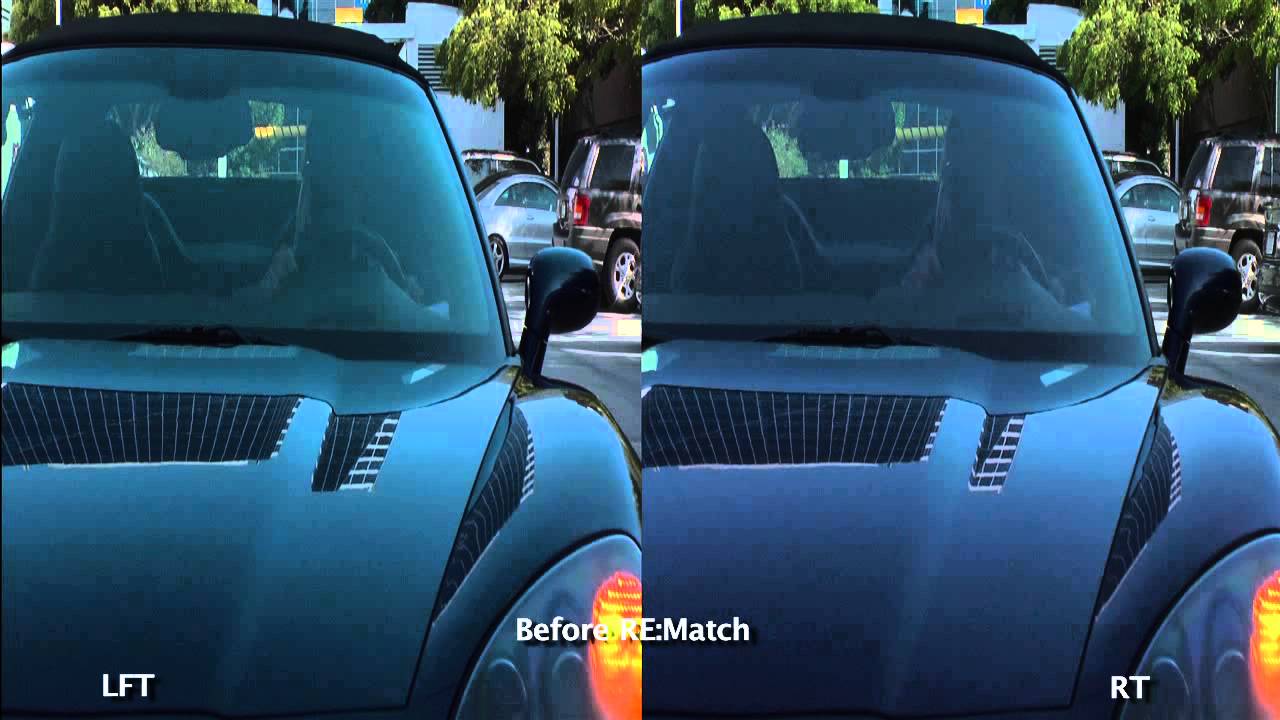
In this example, you will see that RE:Match Stereo matches one view to the other, despite the fact that the car reflects a slightly different color at a different angle.
Nick Brooks, Academy Award and Emmy Award winner for visual effects, says RE:Match provides "amazing color matching for stereo pairs... really!!! The specular and optical aberrations matching is high quality and very effective."
Jonathan Banta, stereo pipeline designer, says "The smart guys at RE:Vision Effects have created a very cool toolset that I have been lobbying for for a long time. Brilliant!"
RE:Match Features
Match colors automatically
Easy to control
Stereo match
Color matching
Mask Shapes
Crop window
Footage requirements
Color Correction Dissolve
Handles more than one cut
Reuse a color correction
HDR Imagery
Auto image registration
Auto image registration
Occlusions
Frame edge differences
Refine within matte
No stereo alignment required
Learn how to use RE:Match’s features
Instructional videos, and example videos, that help you learn how to get the most of each plug-in's robust features.
Download
Try RE:Match for Free
RE:Match V2 – After Effects, Premiere Pro
RE:Match V2 – After Effects, Premiere Pro
TRIAL DOWNLOAD & LICENSE COMPATIBILITY
When you download a RE:Match or purchase a RE:Match license for After Effects it is compatible with the following:
After Effects
CS6, CC, CC 2014, CC 2015, CC 2017, CC 2018, CC 2019, 2020
Premiere Pro
CS6, CC, CC 2014, CC 2015, CC 2017, CC 2018, CC 2019, 2020
Note if using AE CC 2015, that you will need to use 2015.0.1 (13.5.1) or later.
RE:Match V1 – After Effects, Premiere Pro
RE:Match V1 – After Effects, Premiere Pro
TRIAL DOWNLOAD & LICENSE COMPATIBILITY
When you download a RE:Match or purchase a RE:Match license for After Effects it is compatible with the following:
After Effects
CS5, CS5.5, CS6, CC, CC 2014, CC 2015, CC 2017, CC 2018
Premiere Pro
CS5, CS5.5, CS6, CC, CC 2014, CC 2015, CC 2017, CC 2018
Note if using AE CC 2015, that you will need to use 2015.0.1 (13.5.1) or later.
Purchase RE:Match
License for After Effects
Regular license works with After Effects, Autograph, Catalyst Edit, Diamant and Dustbuster+, HitFilm, Premiere Pro, Resolve, and Vegas Pro.
Pro license works with After Effects, Autograph, Baselight, Diamant and Dustbuster+, Flame, Fusion Studio, HitFilm, Mistika, Natron, Nuke, Premiere Pro, Resolve, Scratch, and Silhouette. Pro license also works with regular product of any supported host.
Additional License Options
We offer several types of licensing options for both our interactive and render-only plug-ins: floating license, non-floating license, and volume license (read the licensing overview for more information). If you are interested in volume licensing or have other questions about these license options, please contact us. All floating licenses require installing our floating license server.
Features, pricing and availability are subject to change without notice.
Interactive license options
Floating Licenses
| RE:Match Pro v2 Floating License | PURCHASE FLOATING LICENSE | |
| RE:Match Pro v2 Floating License | Upgrade any regular version to v2 floating | |
| RE:Match Pro v2 Floating License | Upgrade pre-v2 non-floating Pro to v2 floating | |
| RE:Match Pro v2 Floating License | Upgrade v2 non-floating Pro to v2 floating | |
| RE:Match Pro v2 Floating License | Upgrade pre-v2 floating to v2 floating |
Render-only license options
Render-only licensing is for use with After Effects' render-only program 'aerender'. Render-only licenses do not work in AE’s Render Queue (for Render Queue rendering you need an interactive license). Note that the RE:Match render-only licenses only work on projects written with an interactive license (so you must have at least one standard, floating or Non-Floating interactive license for the render-only licenses to be valid).
Floating Licenses
| RE:Match Pro v2 / Render-Only Floating License | PURCHASE FLOATING LICENSE | |
| RE:Match Pro v2 / Render-Only Floating License | Upgrade any regular version to v2 floating | |
| RE:Match Pro v2 / Render-Only Floating License | Upgrade pre-v2 Pro non-floating to v2 floating | |
| RE:Match Pro v2 / Render-Only Floating License | Upgrade v2 non-floating Pro to v2 floating | |
| RE:Match Pro v2 / Render-Only Floating License | Upgrade pre-v2 floating to v2 floating |
Non-Floating Licenses
| RE:Match v2 / Render-Only | PURCHASE NON-FLOATING LICENSE | |
| RE:Match Pro v2 / Render-Only | PURCHASE NON-FLOATING LICENSE | |
| RE:Match v2 / Render-Only | Upgrade from a previous render-only regular version of RE:Match | |
| RE:Match Pro v2 / Render-Only | Upgrade from a previous render-only version of RE:Match Pro | |
| RE:Match Pro v2 / Render-Only | Upgrade from a previous or current version of RE:Match regular |